 Featured
Conferences
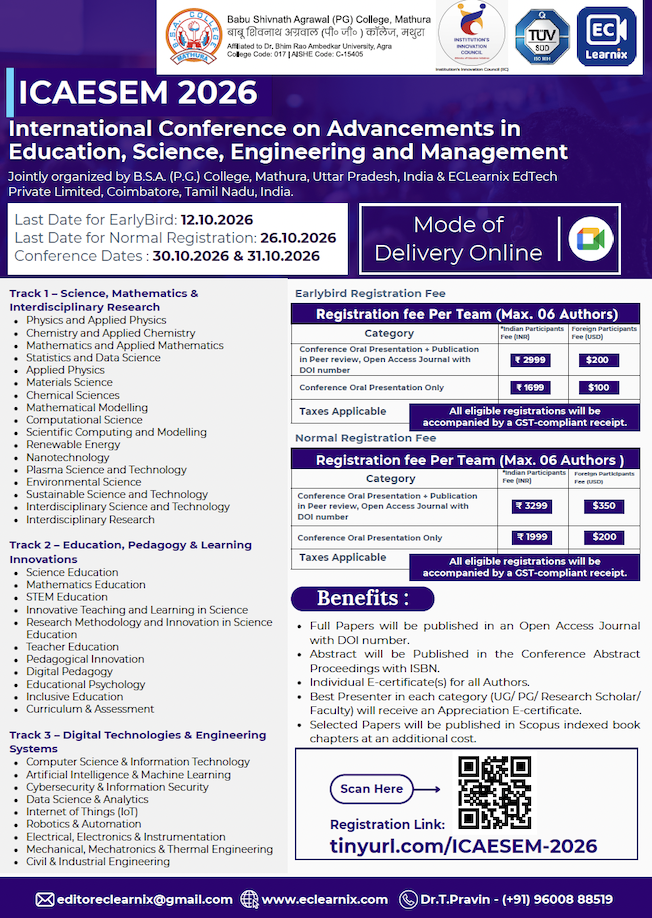
International Conference on Advancements in Education, Science, Engineering and Management ICAESEM 2026
30 Oct 2026 · Online
View event ↗Learn Share Grow
Hosted by Engineering Forum
Important Sessions on:
Android Intro and jargons:
Android is a mobile operating system developed by Google, based on the Linux kernel and designed primarily for touchscreen mobile devices such as smartphones and tablets.
Android's user interface is mainly based on direct manipulation, using touch gestures that loosely correspond to real-world actions, such as swiping, tapping and pinching, to manipulate on-screen objects, along with a virtual keyboard for text input.
Android Application Layouts :
The Android framework gives you the flexibility to use either or both of these methods for declaring and managing your application's UI.
For example, you could declare your application's default layouts in XML, including the screen elements that will appear in them and their properties. You could then add code in your application that would modify the state of the screen objects, including those declared in XML, at run time.
Android SDKs and IDEs :
Android Studio provides the fastest tools for building apps on every type of Android device.
World-class code editing, debugging, performance tooling, a flexible build system, and an instant build/deploy system all allow you to focus on building unique and high quality apps.
Learning Activities :
Activities are one of the fundamental building blocks of apps on the Android platform.
They serve as the entry point for a user's interaction with an app, and are also central to how a user navigates within an app (as with the Back button) or between apps (as with the Recents button).
Menus and User Interface :
Menus are a common user interface component in many types of applications. To provide a familiar and consistent user experience, you should use the Menu APIs to present user actions and other options in your activities.
Beginning with Android 3.0 (API level 11), Android-powered devices are no longer required to provide a dedicated Menu button. With this change, Android apps should migrate away from a dependence on the traditional 6-item menu panel and instead provide an app bar to present common user actions.
Manifest & XML Code :
Every application must have an AndroidManifest.xml file (with precisely that name) in its root directory.
The manifest file provides essential information about your app to the Android system, which the system must have before it can run any of the app's code.
Workshop session teaches you how to build a user interface using Android layouts for all types of devices.
Designing Android App :
Android provides a flexible framework for UI design that allows your app to display different layouts for different devices, create custom UI widgets, and even control aspects of the system UI outside your app's window.
Important Sessions on:
Android Intro and jargons:
Android is a mobile operating system developed by Google, based on the Linux kernel and designed primarily for touchscreen mobile devices such as smartphones and tablets.
Android's user interface is mainly based on direct manipulation, using touch gestures that loosely correspond to real-world actions, such as swiping, tapping and pinching, to manipulate on-screen objects, along with a virtual keyboard for text input.
Android Application Layouts :
The Android framework gives you the flexibility to use either or both of these methods for declaring and managing your application's UI.
For example, you could declare your application's default layouts in XML, including the screen elements that will appear in them and their properties. You could then add code in your application that would modify the state of the screen objects, including those declared in XML, at run time.
Android SDKs and IDEs :
Android Studio provides the fastest tools for building apps on every type of Android device.
World-class code editing, debugging, performance tooling, a flexible build system, and an instant build/deploy system all allow you to focus on building unique and high quality apps.
Learning Activities :
Activities are one of the fundamental building blocks of apps on the Android platform.
They serve as the entry point for a user's interaction with an app, and are also central to how a user navigates within an app (as with the Back button) or between apps (as with the Recents button).
Menus and User Interface :
Menus are a common user interface component in many types of applications. To provide a familiar and consistent user experience, you should use the Menu APIs to present user actions and other options in your activities.
Beginning with Android 3.0 (API level 11), Android-powered devices are no longer required to provide a dedicated Menu button. With this change, Android apps should migrate away from a dependence on the traditional 6-item menu panel and instead provide an app bar to present common user actions.
Manifest & XML Code :
Every application must have an AndroidManifest.xml file (with precisely that name) in its root directory.
The manifest file provides essential information about your app to the Android system, which the system must have before it can run any of the app's code.
Workshop session teaches you how to build a user interface using Android layouts for all types of devices.
Designing Android App :
Android provides a flexible framework for UI design that allows your app to display different layouts for different devices, create custom UI widgets, and even control aspects of the system UI outside your app's window.
Workshop
Go Digital
Experts from Industry
Android App Development Tricks Student Workshop
June 18 2017
CADD CENTRE,
4TH FLOOR,KRASS BUILDING,
DR.RADHAKRISHNAN SALAI,
MYLAPORE, ABOVE YELLOW PAGES,
CHENNAI – 600 004
No
Featured
30 Oct 2026 · Online
View event ↗ Featured
31 Oct 2026 · Chennai
View event ↗ Featured
01 Nov 2026 · Chennai
View event ↗Explore more upcoming events like this.